In July 2026, headlines reported that researchers had used a laser to reset the access code on a Tangem card. If you keep your crypto on a card or ring, that’s an unsettling thing to read over breakfast.
So can a seedless wallet be hacked? Yes, but not easily, and usually not in the way the headlines suggest. The attacks most likely to cost you money don’t involve lasers. They involve you being tricked into approving something.
Can a Seedless Wallet Be Hacked
This guide goes attack by attack: what each one needs, whether a seedless design stops it, and exactly what you can do about it.
The short answer
Yes, a seedless wallet can be attacked, but not easily. It removes the most common theft method: stolen or phished seed phrases. The realistic risks are being tricked into approving a malicious transaction, fake apps and support scams, and malware on your phone. Physical attacks on the card itself need a specialist lab.
The hardware is hard to break. The weak point, as with most crypto theft, is usually the person and the phone around it.
Three ways any wallet gets attacked
Every attack on a crypto wallet falls into one of three groups: remote attacks over the internet, physical attacks on the device, and social engineering that tricks you into helping. Seedless design changes the remote and social picture far more than the physical one.
- Remote attacks. Malware, phishing websites and malicious smart contracts. These can reach anyone, anywhere, at scale, which is why they account for a large share of crypto losses.
- Physical attacks. Someone needs your actual card or ring. They’re limited to people who can get hold of it, and to attackers with the right equipment.
- Social engineering. Scammers persuade you to hand over information, install something or approve a transaction. They often combine with remote attacks.
A seed phrase is valuable in all three: it can be phished remotely, found physically or talked out of you. Removing it removes a target that every type of attacker would otherwise aim for.
Each attack, what it needs, and whether seedless stops it
Seedless design fully removes seed phrase theft. It reduces the risk from a lost or stolen card, as long as your access code is strong and your cards are stored apart. It does not stop scams that trick you into approving a transaction, fake apps or phone malware. Each attack in turn:
1. Seed phrase theft and phishing
What it needs: your recovery words, obtained from a photo, a cloud backup, a fake website or a fake support agent.
Does seedless stop it? Yes. In a seedless setup, there are no words to steal. If anyone asks for your seed phrase, it’s a scam, full stop.
2. Malicious transactions and wallet drainers
What it needs: you, connecting your wallet to a malicious website or approving a transaction that does something other than you think, such as granting unlimited access to your tokens.
Does seedless stop it? No. Your wallet signs whatever you approve. Drainer scams often arrive as fake airdrops, fake mints or urgent “verify your wallet” messages. This is one of the most likely ways to lose funds on any wallet.
3. Fake apps and fake support
What it needs: you, installing a lookalike app or trusting someone claiming to be from Tangem.
Does seedless stop it? Partly. A fake app can’t copy the key off your card, but it can trick you into signing transactions or sending funds. Only install the Tangem app from the official App Store or Google Play listing.
This is happening in New Zealand right now. In July 2026, NZ Police and the National Cyber Security Centre (NCSC) warned that scammers were impersonating police officers and crypto wallet support staff to target wallet holders. Police will never make unsolicited requests for wallet details, access codes or seed phrases.
4. Phone malware
What it needs: malicious software on the phone you use with your wallet.
Does seedless stop it? Partly. Malware can’t extract your private key, because it never leaves the chip. But Tangem has no screen of its own, so you rely on your phone to show what you’re signing. Compromised software could, in theory, show one thing while asking the card to sign another. Keep your phone updated and avoid sideloaded apps.
5. A stolen card and a weak access code
What it needs: your card, plus your access code, guessed or obtained.
Does seedless stop it? Mostly, if you choose a strong code. After six wrong attempts, Tangem adds a delay before each new guess, rising up to 45 seconds. Codes can include letters, numbers and symbols.
One detail matters here: resetting a forgotten access code needs two of your cards. If you keep all your cards together and someone steals them, they may be able to reset the code. Storing cards in separate places protects you against that. Tangem Wallet 2.0 also lets you turn off access code recovery entirely, at the cost of losing that safety net if you forget your code.
6. Lab-grade physical attacks
What it needs: your card, specialist equipment and expert time.
Does seedless stop it? Not entirely. Ledger’s security team, Ledger Donjon, has published two lab-based attacks on Tangem cards. The first described bypassing the delay between access code guesses. Tangem responded that a card would become permanently unusable long before a strong code was guessed.
The second, in July 2026, used a laser to reset the access code, with lab equipment Ledger estimated at about US$250,000 and roughly two hours per card. Tangem described the risk to everyday users as virtually non-existent and noted that Ledger is a competitor. Neither attack extracts the private key itself, but an attacker who gets past the access code could use the card to move funds.
7. Counterfeit or tampered devices
What it needs: you buying a fake or pre-used device from an unofficial seller.
Does seedless stop it? Partly. The Tangem app checks each card’s authenticity when you scan it. Buy new and sealed from Tangem or an authorised seller, and never use a device that’s already been set up.
How each wallet type holds up
No wallet type stops every attack. Seedless card wallets and seed phrase hardware wallets both protect keys well against remote theft. They differ mainly on phrase phishing and on whether you can check transactions on the device itself. Exchanges add account-level risks that self-custody avoids.
| Attack | Seed phrase hardware wallet | Seedless card wallet (e.g. Tangem) | MPC wallet | Exchange account |
|---|---|---|---|---|
| Seed phrase phishing | Main risk | Not possible | Not possible | Not applicable |
| Malicious transaction approval | Still a risk | Still a risk | Still a risk | Less common |
| Fake apps and support scams | Still a risk | Still a risk | Still a risk | Still a risk |
| Phone or computer malware | Reduced; the device screen helps you check | Reduced; you rely on the phone screen | Reduced; depends on the provider | Account takeover risk |
| Stolen device | Protected by PIN | Protected by access code; store cards apart | Phone theft partly mitigated | Not applicable |
| Lab-grade physical attack | Possible on some models; needs expertise | Demonstrated in labs (2026) | Not applicable | Not applicable |
| Exchange hack or insolvency | Not applicable | Not applicable | Provider risk | Main risk |
“Still a risk” doesn’t mean equally likely. It means the wallet’s design alone won’t save you, and your own habits make the difference.
Ranking the real risks
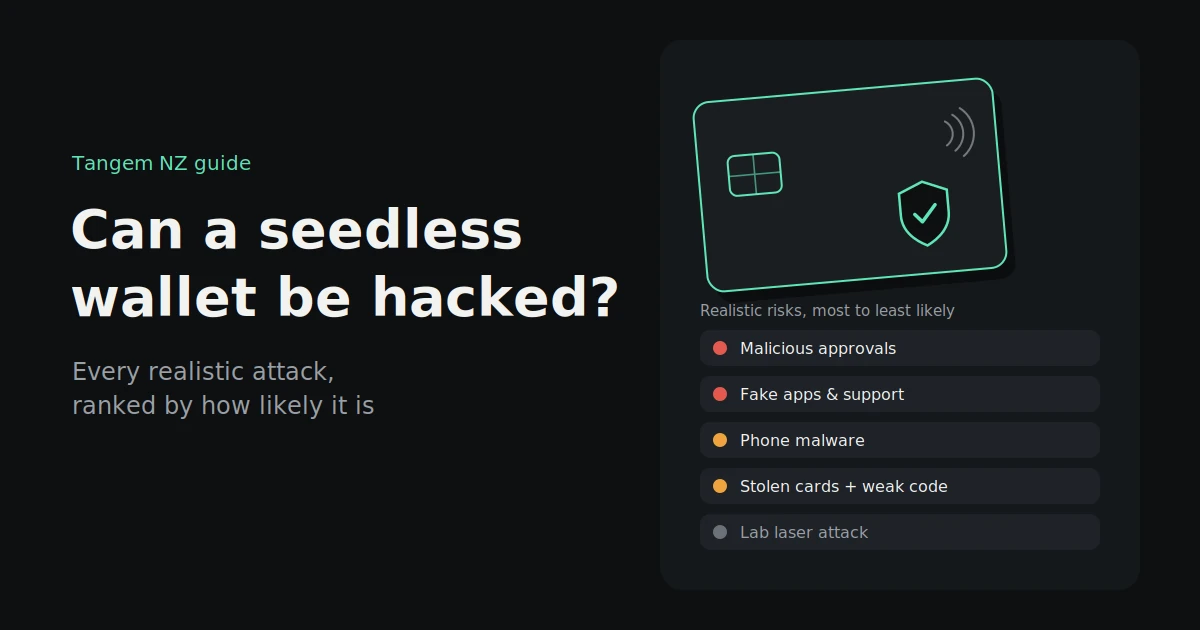
For an everyday New Zealand holder, the biggest risks come from scams that make you act: approving a malicious transaction, or trusting a fake app or support agent. Lost cards and phone malware come next. Lab-grade physical attacks are real but, for most people, by far the least likely.
Our take, from most to least likely for a typical holder:
- Approving a malicious transaction through a fake airdrop, mint or “wallet verification” site
- Fake apps and fake support agents on social media, search ads or messaging apps
- Losing all your cards, which is a loss of access rather than a hack, but just as costly
- Phone malware, especially from sideloaded apps or outdated software
- A stolen set of cards kept together with a guessable access code
- Counterfeit devices from unofficial marketplaces
- Lab-grade physical attacks, which need your card, specialist equipment and expertise
The threats you can most easily prevent are also the most likely, which is good news. Most of your protection comes down to habits.
How to protect a seedless wallet against each attack
Most protection comes from a handful of habits: read what you sign, avoid unknown sites, use a strong access code, install only official apps, keep your phone updated, store your cards apart, and buy only from authorised sellers. Together, these cover nearly every realistic attack.
- Read every transaction before you sign. Check the amount, the recipient address and whether it’s an approval. If you don’t understand what you’re signing, don’t sign it.
- Be suspicious of free tokens and urgent messages. Unexpected airdrops, “claim now” offers and “your wallet needs verifying” messages are classic drainer bait.
- Review and revoke token approvals you no longer need, using a reputable approval checker.
- Use a strong access code. Use a mix of letters, numbers and symbols, and nothing you’ve used elsewhere or that relates to your birthday.
- Install only the official Tangem app, from the official App Store or Google Play listing. Never install wallet apps from links in messages.
- Keep your phone secure. Install software updates, avoid sideloaded apps, and use a screen lock.
- Store your cards in separate places. This protects you against loss and stops a thief from getting two cards at once.
- Buy only from Tangem or an authorised seller, and let the app verify each device.
- Never share your access code, and remember that genuine support will never ask for it.
What to do if you think you’ve been targeted
Act quickly but calmly. Stop interacting with the suspicious site, app or person, revoke any token approvals you granted, and move remaining funds to a fresh wallet if you think anything was compromised. Then report it to NZ Police and the NCSC, and be wary of anyone offering to recover your funds.
- Stop engaging. Close the website, hang up the call and don’t reply to messages. Don’t sign anything else.
- Revoke approvals. If you connected to a suspicious site, use a reputable approval checker to revoke token approvals you granted.
- Move remaining funds. If you think a transaction approval, app or device has been compromised, set up a fresh wallet and transfer what’s left to it.
- Report it. Report scams and fraud to NZ Police on 105, online or by phone. You can also report to the NCSC through its website or on 0800 114 115.
- Warn others and keep records. Save screenshots, transaction IDs and wallet addresses. They help investigators, and other people avoid the same scam.
- Beware of recovery scams. After a theft, “recovery services” often contact victims, offering to get funds back for a fee. The Financial Markets Authority has warned about these. Treat any unsolicited recovery offer as another scam.
FAQs
Can a Tangem wallet be hacked?
Not easily. Its keys stay inside a certified secure chip and never leave it, and there’s no seed phrase to phish. Researchers have shown lab-based attacks that need your physical card and specialist equipment. The more realistic risks are scams that trick you into approving transactions.
Can someone hack my Tangem card with NFC from a distance?
It’s very unlikely. NFC only works at a range of a few centimetres, and using your card on another phone still needs your access code. Someone tapping your card or ring without the code can’t move your funds.
Can malware on my phone steal crypto from Tangem?
It can’t extract your private key, which stays on the card. But because Tangem has no screen, malware on your phone could in theory try to trick you into approving the wrong transaction. Keep your phone updated and only use the official app.
What was the 2026 Tangem laser attack?
In July 2026, Ledger’s research team Ledger Donjon described using a laser to reset a Tangem card’s access code. It needed the physical card, lab equipment Ledger estimated at about US$250,000 and about two hours per card. Tangem called the risk to everyday users virtually non-existent.
Is a seedless wallet harder to hack than a Ledger?
They protect against different things. Seedless wallets remove seed phrase phishing. Screen-based hardware wallets like Ledger let you check transactions on the device itself. Both keep keys offline, and both rely on you checking what you sign.
What should I do if my crypto was drained?
Stop interacting with the suspicious site or contact, revoke any approvals, and move remaining funds to a new wallet. Report it to NZ Police on 105 and to the NCSC. Ignore anyone offering to recover your funds for a fee.
A seedless wallet won’t make you un-scammable, but it takes away the target that attackers want most. Pair it with a strong access code, separately stored cards and a habit of reading before you sign, and you’ve covered the attacks that actually happen.
Buy genuine Tangem wallets from Tangem NZ, an authorised New Zealand seller, with NZD pricing including GST. If you have a question about setting up your wallet securely, get in touch with our New Zealand team and we’ll walk you through it.