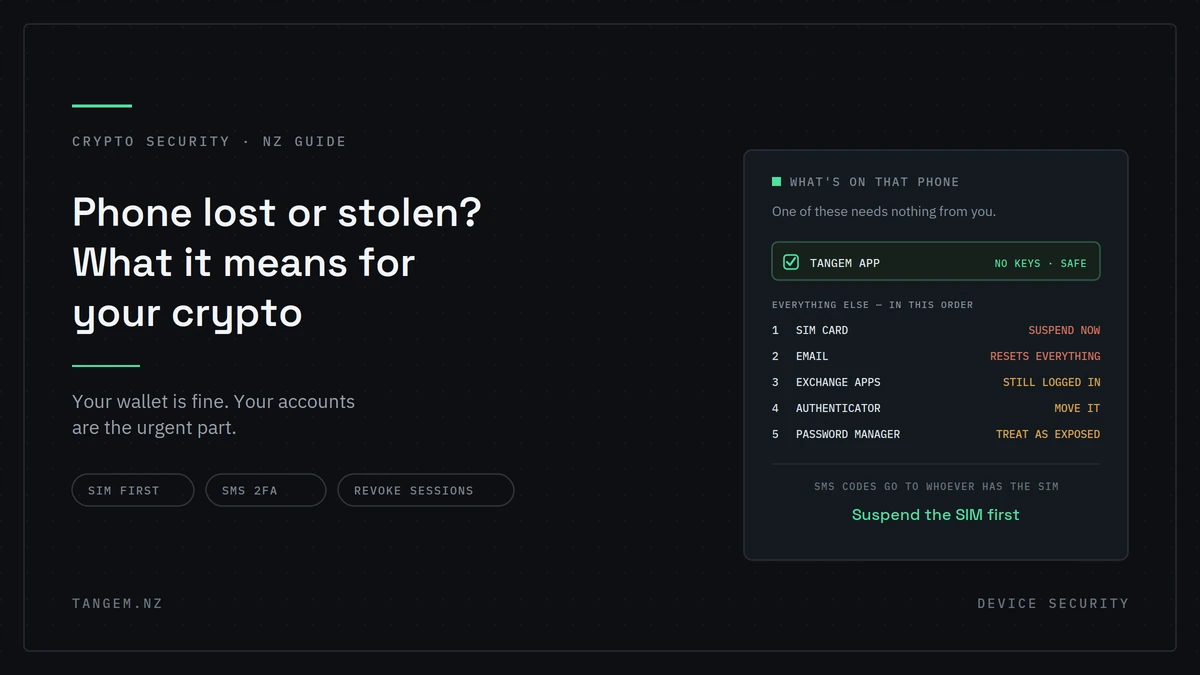
If you’ve just lost your phone and you’re reading this in a hurry: your Tangem wallet is fine. The app holds no keys. Install it on another phone, tap your card, and everything is exactly where you left it.
The wallet is genuinely the one thing on that phone you don’t need to worry about. What does need your attention in the next hour is everything else: the exchange apps still logged in, the SMS codes now arriving on a device somebody else is holding, and the email account that can reset all of it.
The short answer on Tangem wallet security
Nothing happens to your Tangem wallet. The app is an interface, not a vault. Your private keys live on the card’s chip and never touch the phone.
Your accounts are a different matter. A stolen phone is a serious crypto risk, just not through the hardware wallet.
Why the wallet is unaffected
The app is a window, not a vault
Your private key was generated inside the card’s chip and cannot be exported from it. The phone app shows balances, builds transactions and talks to the blockchain, but it can’t move anything on its own.
When you send crypto, the app passes an unsigned transaction to the card, the chip signs it internally, and the signature comes back. What travels is a signature, never a secret. Our explanation of how seedless wallets work covers the mechanism in more detail.
What a thief can and can’t do
They might see: your balances, if the phone was unlocked or their screen lock guess works.
They cannot: move any funds. That requires physical possession of one of your cards and your access code. Holding your phone gets them neither.
Visible balances are a privacy issue rather than a financial one, though they’re a reason not to leave large holdings on show on an unlocked phone.
What actually needs your attention
Most articles on this topic stop at the wallet. The wallet is safe. The accounts on that phone may not be.
Exchange apps still logged in
Session tokens persist. If your exchange app doesn’t require a fresh login every time, and most don’t, whoever has the phone may have access to balances, trading and possibly withdrawals.
Depending on the platform, that can also expose linked bank details and your identity documents.
SMS 2FA arriving on the stolen device
This is the one that turns a bad situation into a compounding one.
If your two-factor codes come by SMS, they’re now being delivered to a device somebody else is holding. Every account protected that way is protected by something the thief has.
That’s the concrete version of the advice everyone gives in the abstract, and it’s why our security checklist puts app-based 2FA in the top five.
Your email
Email is the recovery path for nearly every account you own. Whoever controls it can reset passwords across your exchanges, your cloud storage and your financial accounts.
If your email app was logged in on that phone, this is the most urgent item on the list after the SIM.
Authenticator apps
Often not protected behind a separate biometric or PIN, which means opening the app is enough. An authenticator on an unlocked stolen phone is a set of keys to everything it protects.
Password managers and saved browser passwords
Same principle. If the vault was unlocked or the browser was saving logins, treat everything in it as exposed.
| On your phone | Risk if stolen | Urgency | What to do |
|---|---|---|---|
| Tangem app | None, no keys stored | None | Nothing |
| SIM card | SMS codes go to the thief | Immediate | Suspend with your carrier |
| Email app | Password resets for everything | Immediate | Change password, revoke sessions |
| Exchange apps | Balances, trading, withdrawals | High | Change password, revoke sessions |
| Authenticator app | Codes for all protected accounts | High | Move to a new device |
| Password manager | Everything in the vault | High | Change master password |
| Hot wallet apps | Funds directly at risk | Immediate | Move funds if a seed was on the device |
| Banking apps | Financial access | High | Contact your bank |
The first hour: do these in this order
Sequence matters, because each step is the recovery route for the one after it. Working through them in the wrong order can undo your own efforts.
- Suspend your SIM. Call your carrier. Until this is done, SMS codes are going to whoever has your phone, and that undermines everything else you’re about to do.
- Change your email password and revoke active sessions from another device. Email resets everything else.
- Secure your exchange accounts. Change passwords and revoke active sessions. Most exchanges have a “log out all devices” option.
- Move your authenticator to a new device using your backup codes.
- Remote-lock or wipe the phone via Find My iPhone or Find My Device.
- Change remaining passwords, starting with anything financial.
- Report it to your carrier and to Police if it was stolen.
Why the SIM comes first
Because everything downstream depends on it. Reset your email password while the thief still has your SIM and any SMS-based recovery on that account may hand them the new one.
Close the SMS channel, then work through the rest.
What a hardware wallet actually protects you from here
Your Tangem wallet is the only account on that phone that a thief gains nothing from.
That’s not nothing. Compare the two scenarios:
Phone stolen with a hot wallet or seed phrase on it: funds are directly at risk and you’re moving what’s left immediately.
Phone stolen with the Tangem app on it: the app is a viewer with no keys. Your crypto is unaffected, and you deal with the accounts like anyone else who’s lost a phone.
What it doesn’t protect: everything in the table above. Hardware secures keys, not accounts. The exchange balances, the email, the authenticator are exposed exactly as they would be for anyone.
That’s the accurate version. Not “a hardware wallet keeps you safe when your phone is stolen,” but “your crypto is the one part you don’t have to think about while you sort out the rest.”
Getting your wallet back on a new phone
This is straightforward, and it works on any compatible phone, including a borrowed one. That’s useful when you’re standing in a shop replacing a handset.
- Install the Tangem app
- Tap your card to the phone
- Your wallet, balances and history are there
No account recovery, no support ticket, no seed phrase to type. Nothing was on the old phone to be restored.
Reducing the damage before it happens
Most of these take a few minutes and would meaningfully change how bad a stolen phone is.
- Switch to app-based 2FA on every account that offers it. SMS is the weakest widely-offered second factor and it fails completely in this scenario.
- Put a biometric lock on your authenticator, banking and exchange apps individually, not just on the phone.
- Use a dedicated email address for crypto accounts, ideally not the one on your phone’s home screen.
- Never store an access code or seed phrase on the phone. No notes app, no photos, no password manager entry.
- Enable device encryption and remote wipe, and confirm they actually work before you need them.
- Keep 2FA backup codes somewhere offline, because you’ll need them to restore an authenticator.
The one to do today
Write your carrier’s suspension number somewhere that isn’t your phone.
It’s obvious, almost nobody does it, and the moment you need it you won’t have the device you’d normally look it up on. A card in your wallet or a note on the fridge is enough.
FAQs
Can someone access my Tangem wallet with my phone?
No. The app holds no private keys. Those are on the card’s chip. Moving funds requires physical possession of a card and your access code. A thief with your phone has neither.
Do I need to do anything to my wallet if my phone is stolen?
No. Install the app on a new phone and tap your card. Your attention belongs on your SIM, email, exchange accounts and authenticator instead.
How do I get my wallet onto a new phone?
Install the Tangem app, tap a card from your set, and everything appears. Nothing needs restoring because nothing was stored on the old device.
What should I do first if my phone is stolen?
Suspend your SIM. Until that’s done, SMS codes are being delivered to whoever has your phone, which undermines every other step you take.
Is SMS two-factor authentication safe if my phone is gone?
No. It’s actively working against you at that point. This is the clearest argument for using an authenticator app instead, and for keeping backup codes somewhere offline.
Can a thief see my crypto balances?
Possibly, if the phone was unlocked. They can view but not move funds. It’s a privacy exposure rather than a financial one, though it’s a reason to keep your phone properly locked.
What if my access code was saved on the phone?
Then treat it as compromised. Your cards are still needed to move funds, so the risk is lower than with a seed phrase. Change the access code anyway, and if a card is also missing, move your funds to a new wallet.
Need a replacement card set, or want to move to a wallet that doesn’t live on your phone? Tangem NZ is an authorised New Zealand seller with stock in Auckland and NZ$ pricing including GST.