You’ve just bought a Tangem wallet, and the setup screen is asking you to activate backup cards, but nobody has shown you a 24-word phrase to write down. If you’ve used a Ledger or Trezor before, that absence feels wrong. Where’s the seed phrase? What happens if you lose a card? Most new Tangem owners hit this exact confusion in the first five minutes. It’s worth understanding properly before you deposit anything.
Tangem wallet backup cards work differently to almost every other hardware wallet on the market. Instead of a written seed phrase, recovery happens through a set of two or three physical cards that each independently hold a full copy of your private key. This guide explains how that works, what happens if you lose a card, and how to set it up so you’re not caught out.
What Tangem backup cards are
A Tangem wallet ships as a set of two or three NFC-enabled cards, and each card independently controls the same wallet and the same funds. Instead of writing down a recovery phrase, you tap a second or third card during setup, and the private key is copied securely between them. Recovery later means tapping another card, not transcribing 24 words under pressure.
This is a meaningfully different security model to traditional hardware wallets like Ledger or Trezor, which generate a single device plus a written seed phrase as the backup. With those wallets, the phrase itself becomes the thing you have to protect: stored on paper, engraved on metal, hidden somewhere safe. The device can fail, get lost, or be replaced, but the phrase is what actually restores access.
Tangem removes that step by default. During activation, the card’s secure chip generates a private key using a certified hardware random number generator. That key never leaves the chip in plaintext form. When you add backup cards, the key is copied to them through a secure card-to-card process, so each card in the set becomes an independent, fully functional way to access the wallet. Not a copy of a copy, but an equal.
How the backup is created, step by step
Setting up Tangem backup means activating your primary card, then tapping each additional card in the set so it receives its own copy of the same private key. At no point is the key displayed, typed, or transmitted outside the cards. The whole process typically takes a few minutes.
The flow in practice:
- Activate the primary card: tap it to the Tangem app, which triggers the chip to generate a new private key internally
- Add backup cards: tap each additional card (you’ll have one or two more, depending on whether you bought a 2-card or 3-card set)
- Secure key transfer: the private key is copied to each backup card through an encrypted process designed so it can’t be intercepted or exposed during the transfer
- Set an access code: this is a PIN-style code that protects the cards from being used if physically stolen; it’s separate from the wallet’s private key
- Confirm and test: the app confirms each card is active and holds identical wallet access
Do this during initial setup if you can. If you skipped it, the app lets you finish the backup later from the wallet’s device settings, as long as the set hasn’t already been finalised. Either way, complete it before you deposit funds. A wallet with one active card and no backup is a single point of failure, the same problem a seed-phrase wallet has if the phrase was never written down.
If you lose one card
If you lose or damage one Tangem card, recovery is simple. Tap a backup card from the same set to your phone and the app shows your full balance and transaction history. No phrase entry, no waiting period. If the lost card was stolen rather than misplaced, it’s worth moving funds to a newly created wallet as a precaution, since a stolen card combined with a guessed access code is a theoretical risk.
Recovery is a physical action, not a data-entry exercise. There’s nothing to type incorrectly, no word order to get wrong, and no faded recovery sheet to squint at when you need it most.
If you’re down to your last working card in a set, treat it carefully. At that point you’ve lost your redundancy, and it’s worth creating a fresh 3-card wallet and transferring funds across rather than continuing to rely on a single card.
Card set versus seed phrase
Both approaches protect against device loss, but they fail differently. A seed phrase’s main risk is human error in writing and storing it. A card set’s main risk is losing every card without another backup in place.
| Factor | Tangem Card Set | Traditional Seed Phrase |
|---|---|---|
| Recovery method | Tap a backup card to your phone | Manually enter 24 words into a new device |
| Main failure risk | Losing all cards in the set | Writing the phrase down incorrectly, or losing/damaging the paper |
| Physical durability | Cards are durable but can be lost, like any card | Paper is fragile; metal backups are more durable but rarely used by default |
| User error risk | Low, no transcription involved | Higher, word order and spelling both matter |
| Portability | Credit card-sized, easy to carry or store | Depends on format (paper, metal plate, etc.) |
| Cross-device compatibility | Recovery generally tied to the Tangem card set itself | A BIP39-compliant phrase can be restored on many different wallet brands |
| Inheritance planning | A third card can be handed to a trusted person directly | Requires securely sharing the phrase itself, which is higher-risk |
Neither model is risk-free. A seed phrase gives you cross-wallet portability that a card set doesn’t. If you ever wanted to move to a different hardware wallet brand, a phrase-based backup travels with you more easily. Tangem’s optional seed phrase feature (covered further down) exists partly to address this gap.
If you lose every card
If every card in your set is lost or destroyed and you never set up an optional seed phrase backup, the funds cannot be recovered. Not by you, not by Tangem, not by anyone. This isn’t a Tangem-specific limitation; it’s how self-custody cryptography works across every non-custodial wallet. The private keys exist only on the cards themselves, and nobody else holds a copy.
Before assuming cards are gone for good, it’s worth checking thoroughly. Tangem cards are credit-card sized and easy to overlook in bags, drawers, old wallets or safes. Search properly before concluding a set is gone.
This is why the multi-card model only works if the cards are actually spread out and treated as backups. Three cards in the same drawer is one card with extra steps.
Access codes and the forgotten-code reset
Each Tangem card is protected by an access code, and if you forget it, resetting it requires scanning both the card with the forgotten code and a backup card from the same set. A single stolen card can’t be used to bypass the code. That two-card requirement is deliberate.
To reset a forgotten access code:
- Open the Tangem app and scan the card with the forgotten code
- Select “Forgot your code?”
- Enter and confirm a new access code
- Scan the primary card, then scan a backup card to confirm the reset
For users who want maximum security, Tangem also allows disabling access code recovery entirely. That closes off the reset pathway completely. It’s useful if you’re worried about a compromised backup card being used to reset access, but it also means you cannot recover the code if you forget it. Think that trade-off through before switching it on.
Where to keep the cards
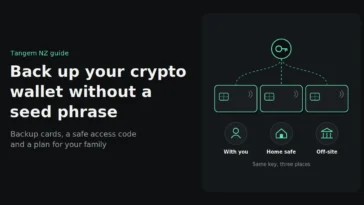
The security of a multi-card backup depends on where you store each card. All in one place defeats the purpose. Spread across separate, secure locations, they protect against fire, theft and plain bad luck hitting more than one card at once.
A practical distribution approach for a 3-card set:
- One card for daily use: carried or kept somewhere easily accessible
- One card at home: in a secure location such as a safe, separate from the daily-use card
- One card with a trusted person, or in a safety deposit box: physically separate from the other two
In New Zealand that might mean one card at home, one with a family member in another town, and one in a bank safe deposit box. A single house fire, burglary or earthquake then can’t take out the whole set.
Test recovery before you rely on it for serious money. Tap each backup card in a low-stakes moment to confirm it opens the wallet, rather than finding a problem the day you need it.
The optional seed phrase
Newer Tangem firmware supports generating an optional seed phrase in addition to the card-based backup, giving users a written recovery path alongside the physical cards. This isn’t the default setup, but it’s available for people who specifically want cross-wallet portability or an additional layer of redundancy.
This might suit you if:
- You want the option to recover your wallet on a different hardware wallet brand in future
- You’re already comfortable managing a seed phrase securely and want the extra redundancy
- You’re holding significant value and prefer layered backup methods rather than relying on one system alone
For most people, a card set that’s been set up and distributed properly covers the same ground without the extra job of guarding a written phrase.
FAQs
Can Tangem recover my wallet for me if I lose all my cards?
No. Tangem never has access to your private keys, since they’re generated and stored only on the cards themselves. If all cards are lost without an optional seed phrase backup, recovery isn’t possible through Tangem or anyone else.
How many backup cards do I need?
Tangem wallets ship as 2-card or 3-card sets. A 3-card set is generally recommended, since it provides a genuine second backup alongside the primary card, plus a natural way to hand a card to a trusted person for inheritance purposes.
What happens if my Tangem card gets wet or damaged?
Tangem cards are built to be durable for everyday carry, but like any physical card, they aren’t indestructible. If one card is damaged, tap a working backup card to restore full access, and consider creating a fresh set if you’re down to your last functioning card.
Do I need to write anything down when setting up Tangem?
Not by default. The standard setup generates no seed phrase, and your card set is the backup. The app does allow an optional seed phrase if you want a written backup as well.
Is losing a Tangem card the same risk as losing a seed phrase?
Not quite. Losing one card in a multi-card set still leaves your other cards fully functional, whereas losing your only copy of a seed phrase with no backup can mean permanent loss of access, since the phrase itself is the sole key.
Can someone steal my funds if they find one of my Tangem cards?
A found or stolen card alone isn’t enough. It’s protected by an access code, and resetting a forgotten code requires a second card from the same set. Still, if a card is stolen rather than misplaced, moving funds to a new wallet is a sensible precaution.
Can I add more backup cards later if I only activated one at first?
Only if the backup was never finished. If you skipped the backup step at setup, the app lets you complete it later from the wallet’s device settings. Once a set is finalised, more cards can’t be added to it; you’d create a new wallet with all the cards you want and transfer funds across. Either way, finish the set before you deposit.
Starting out, or down to your last card? Tangem NZ is an authorised New Zealand seller with 2-card and 3-card sets in stock in Auckland, priced in NZ$ including GST.